
“Present a clear, 45° top-down isometric miniature 3D split diorama showing two parallel worlds of [THEME]: [WORLD A] vs [WORLD B].Use soft refined textures, realistic PBR materials, and contrasting lighting styles for each side.Design a single raised base divided down the center with mirrored layouts and subtle crossover details.Include tiny stylized characters existing differently in each world (no facial details).Use a clean solid [BACKGROUND COLOR] background.At the top-center, display [THEME NAME] in large bold text, beneath it show ‘Parallel Realities’, and place a minimal abstract icon below.All text must automatically match the background contrast (white or black).”
Results for “material detail”
Top 100 prompts
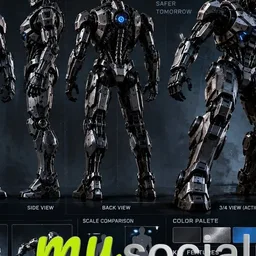
This image reads like a leaked production document: a near-black armored robot named UNIT-77, blue optics glowing behind a faceless visor, presented on a dark board with a full-body front, side, back and 3/4 view lined up across the top. Below it sit six action poses, close-up panels for head, chest, hand and material texture, a color palette strip, a scale comparison against a human figure, and a neon city where this machine would patrol. The whole thing feels cold, engineered and quietly cinematic.
The prompt works because of three deliberate moves. The reference lock paragraph tells the model to preserve faces, outfits and materials exactly, so the character never drifts between panels. The numbered shot list front, side, back, 3/4, action poses, detail crops forces a disciplined grid instead of one hero image. And the concept art styling cues (dark cinematic background, premium studio lighting, technical design lines, clean typography) create the cinematic lighting and documentary credibility that make it look like a real design bible.
To remix it, keep the panel structure but change the subject: upload a fantasy warrior, a creature or a fashion model and let the adaptation paragraph handle the shift. Warm the palette and background for a softer editorial mood, or drop a few detail panels to give the remaining views more room and export at 3:2 or 4:5 if the sheet is heading to a social feed rather than a wide board.
Create a premium, ultra-realistic cinematic CHARACTER SHEET using the PROVIDED CHARACTER REFERENCE IMAGE. REFERENCE LOCK: Use the uploaded image as the exact identity and design reference. Preserve the character’s facial features, body structure, hairstyle, outfit, colors, materials, and recognizable identity with maximum accuracy. Do not redesign or replace the character. CHARACTER SHEET LAYOUT: Create a professional Hollywood / Netflix-style production character sheet similar to a high-end sci-fi film design document. Include: 1. FULL-BODY FRONT VIEW 2. FULL-BODY SIDE VIEW 3. FULL-BODY BACK VIEW 4. 3/4 VIEW / ACTION POSE 5. 4–6 DYNAMIC ACTION POSES 6. CLOSE-UP HEAD DETAIL 7. CHEST / BODY DETAIL 8. HAND / ACCESSORY DETAIL 9. FOOTWEAR / LOWER BODY DETAIL 10. MATERIAL & TEXTURE CLOSE-UPS 11. COLOR PALETTE 12. SCALE COMPARISON (IF APPLICABLE) 13. ENVIRONMENT CONTEXT IMAGE 14. KEY CHARACTER FEATURES LAYOUT & DESIGN: Professional character concept art presentation board. Dark cinematic background, premium studio lighting, technical design lines, organized reference panels, clean typography, realistic proportions, consistent character identity across every view. ADAPTATION: Automatically adapt all details to the uploaded character. If the character is human, focus on facial identity, wardrobe, anatomy, and accessories. If the character is a robot, creature, superhero, or fantasy character, focus on its unique structure, materials, armor, powers, and design elements. TEXT: Generate a suitable character name, designation, short description, and technical feature labels based on the reference image. Keep all text clean, professional, and readable. VISUAL QUALITY: Ultra-realistic, cinematic lighting, photorealistic textures, premium Hollywood production design, sharp details, consistent anatomy, high-end concept art. RESOLUTION LOCK: Generate final images in 16K resolution — 15360 × 8640 pixels (≈132.7 million pixels), 16:9 aspect ratio.
{
"objective": "Create a detailed product showcase image of a table design with multiple perspectives and material information",
"image_specifications": {
"style": "Realistic 3D render or high-quality product illustration",
"layout": "Split view",
"aspect_ratio": "3:2 or 4:3",
"background": "Neutral (light gray or white) to enhance clarity and contrast"
},
"left_side": {
"section_title": "Table Perspectives",
"views": [
{
"view": "Top-down",
"description": "Display the full table from above, showing tabletop shape, surface texture, and edge details"
},
{
"view": "Side view",
"description": "Profile of the table to show leg design, table height, and tabletop thickness"
},
{
"view": "Front view",
"description": "Straight-on view to show width, symmetry, and leg alignment"
}
],
"visual_style": "Consistent lighting and shadows for realism, subtle shadows to define form"
},
"right_side": {
"section_title": "Material Breakdown",
"content": [
{
"material": "Tabletop Surface",
"material_type": "Solid wood / engineered wood",
"swatch_image": "Close-up wood texture sample",
"label_style": "Clean sans-serif text with arrows pointing to table sections"
},
{
"material": "Legs",
"material_type": "Polished oak wood or metal",
"swatch_image": "Close-up material texture sample",
"label_style": "Consistent labeling with visual connection to perspective images"
},
{
"material": "Frame",
"material_type": "Matte black steel",
"swatch_image": "Small metallic texture sample",
"label_style": "Minimalist annotations"
}
]
},
"visual_elements": {
"separation": "Vertical dividing line or subtle split background",
"color_palette": "Natural tones for materials, grayscale for background and lines",
"typography": "Modern, readable font for labels and section titles"
},
"output_format": {
"type": "Image",
"high_resolution": true,
"use_case": [
"Product sheet",
"Interior design catalog",
"Furniture showcase"
]
}
}\Create an isometric miniature 3D diorama representing the iconic architecture of [COUNTRY NAME] through [FAMOUS STRUCTURE]. Use a 45° top-down view.Apply clean soft textures and realistic PBR materials.Lighting feels balanced and natural. The raised base includes nearby streets, landscape features, and cultural details linked to the structure. Add tiny stylized locals and visitors with heavy facial details.Background stays solid [BACKGROUND COLOR]. Top center text shows [COUNTRY NAME] in bold. Second line shows [STRUCTURE NAME]. Place a minimal architecture icon below. Text color adjusts for contrast.
Create a clear, 45° top-down isometric miniature 3D cutaway diorama showing the inside of [MACHINE / DEVICE].Use soft refined textures, realistic PBR materials, and clean technical lighting.Design a raised base with visible internal components, wiring, gears, or energy flow paths.Include tiny stylized technicians interacting with the machinery (no facial details).Use a clean solid [BACKGROUND COLOR] background.At the top-center, display [MACHINE NAME] in large bold text, beneath it show a short technical subtitle, and place a minimal engineering icon below.All text must automatically match the background contrast (white or black).